

Less data entry.More accounting.with AutoBooks

AutoBooks reads invoices, receipts, Z-Reports, and bank statements. An accountant checks every row, and approved entries go to Tally.

Every new workspace includes a 7-day free trial.

  • Nothing posts without approval
  • Works with Tally Prime
  • English, Kiswahili, and French

Reads the files you already receive. Posts to the books you already keep.

  • PDF
  • Photo
  • Excel
  • CSV
  • Z-Reports
  • Bank statements
  • Posts toTally
Features

Everything between the file and the ledger

See all features

Document intake

Accept the files clients actually send: PDF, photo, Excel, or CSV. Keep them organized by type.

AI extraction

Photos and PDFs are read with AI. Spreadsheets are parsed directly. Ledger suggestions come from the books you already keep.

Human review

Edit dates, parties, amounts, tax, and ledgers. Nothing becomes a record until an accountant approves it.

Tally sync

Approved work flows into Tally. AutoBooks prepares. Tally stays the source of truth.

AutoBooks turns the files you already receive into rows an accountant checks, ledgers that are already suggested, and entries that are ready for Tally.

Inside AutoBooks

Built for how a practice runs

Practice pulse

The queue, the open tasks, and the rows still waiting.

The AutoBooks practice pulse: active clients, documents processing, rows pending review, and open tasks.

Many clients, one workspace

Each business stays in its own books.
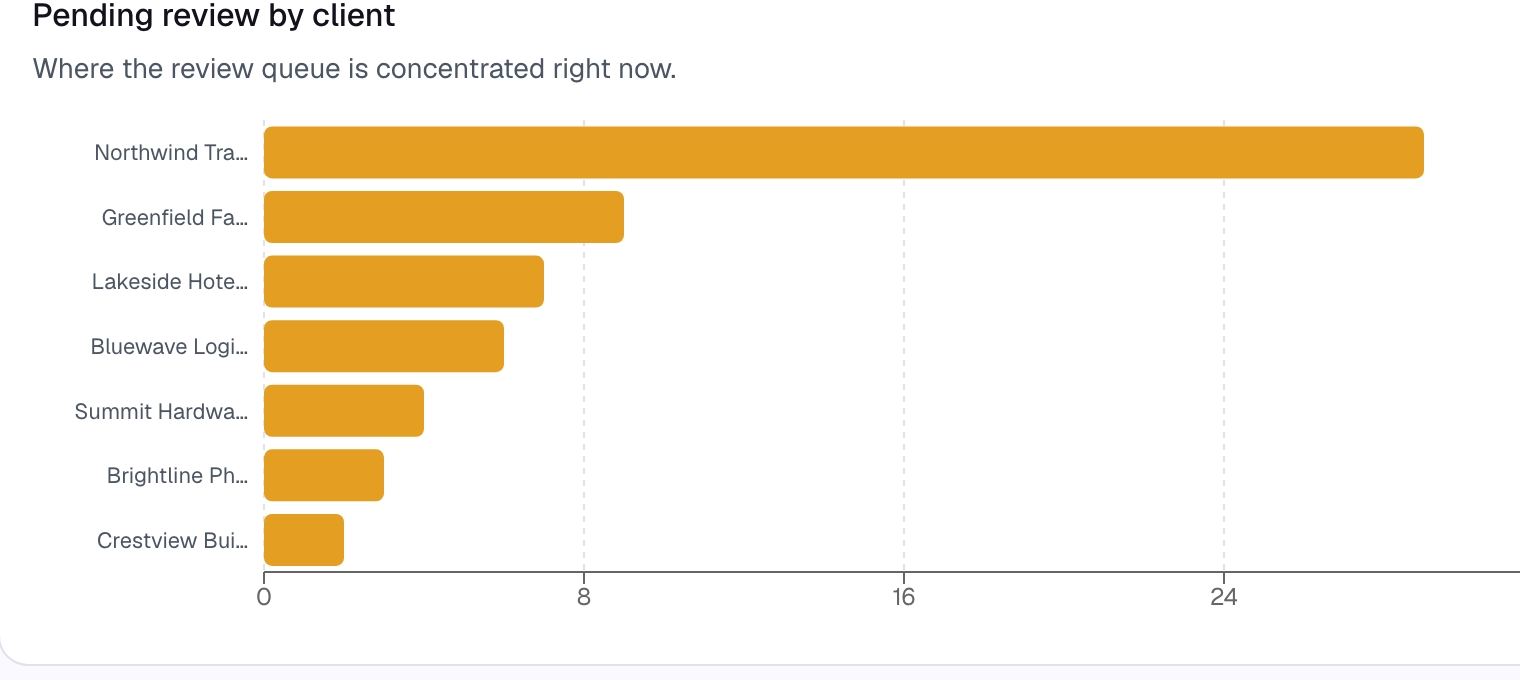
Pending review by client on the AutoBooks dashboard, one bar for each business.

Keyword rules

Save a vendor once. The next match follows.
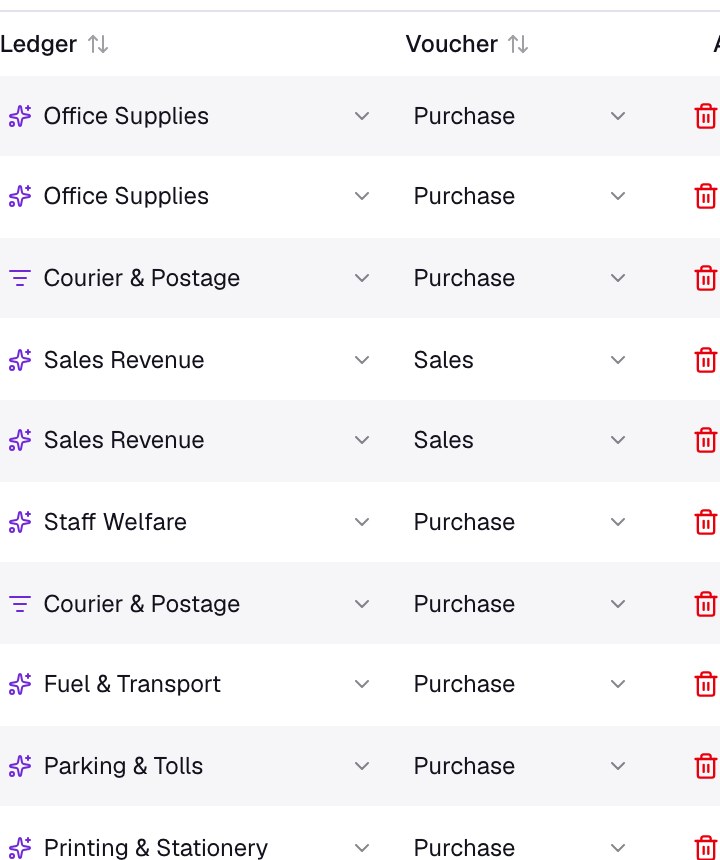
The Review Grid ledger column, with rows assigned by a keyword rule.

Duplicate alerts

The same payment, flagged before posting.
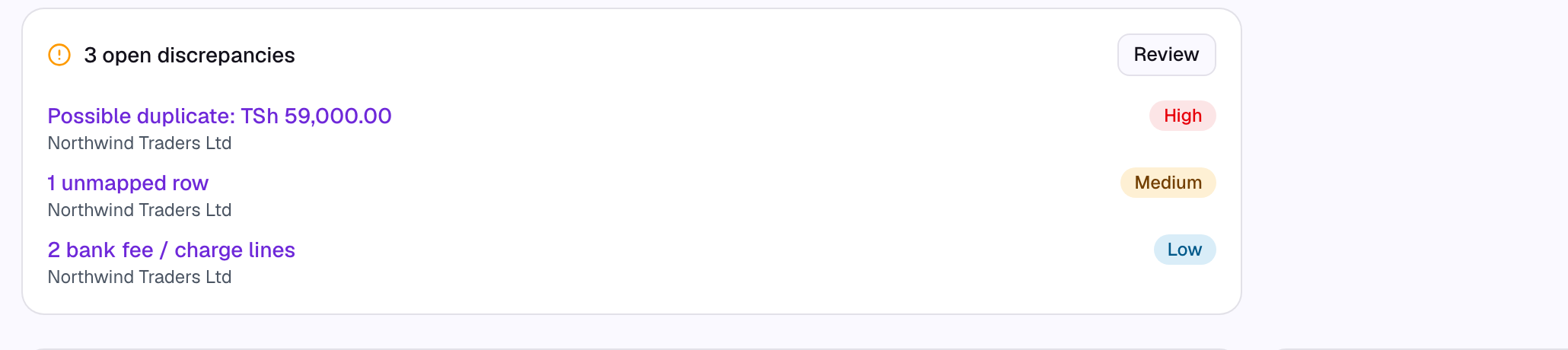
Open discrepancy alerts, including a possible duplicate payment.

On your phone

Review and upload from the AutoBooks app.
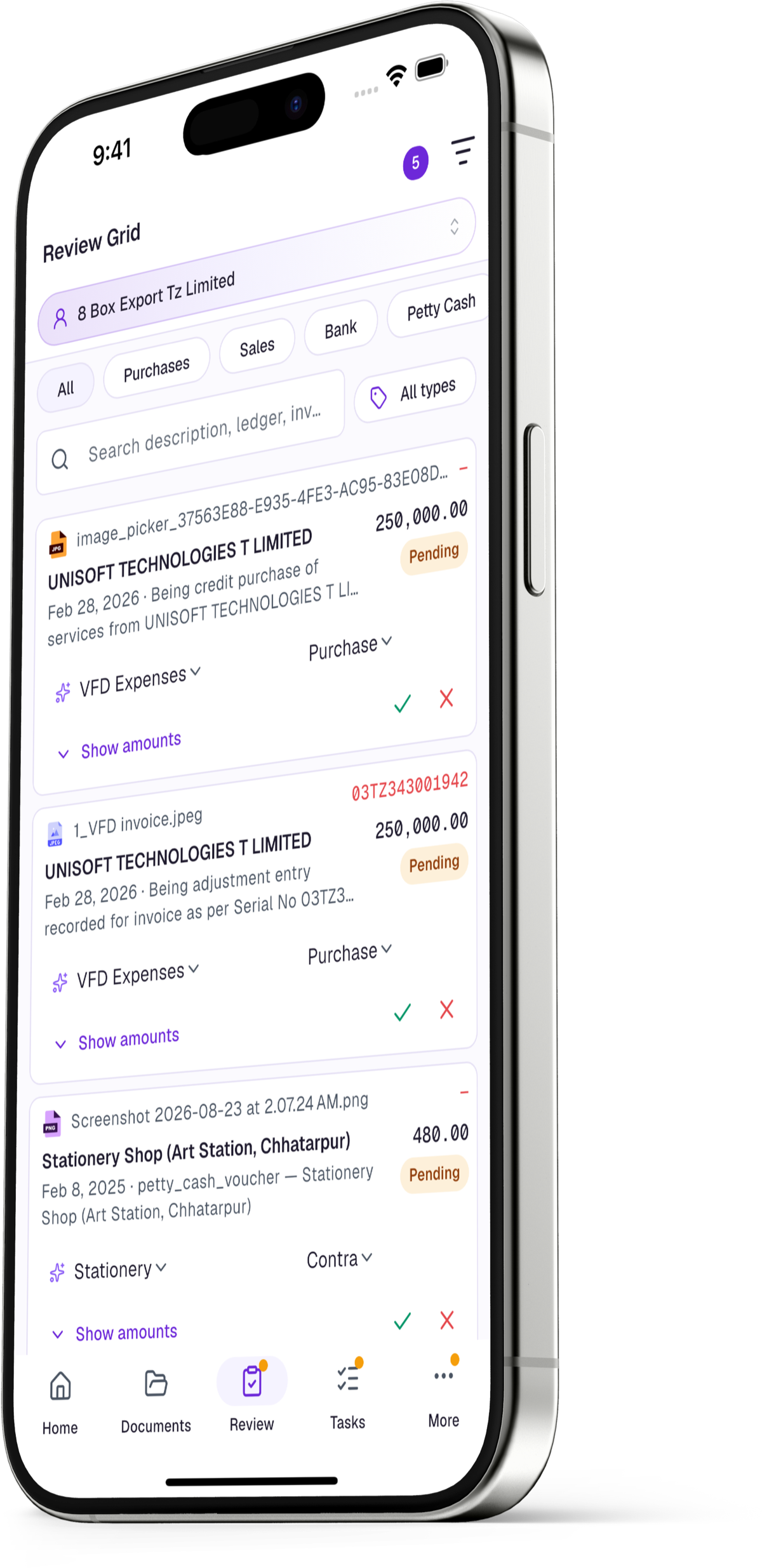
The AutoBooks review list on an iPhone 15 Pro Max.

Every document, read and filed

  • PDF, photo, Excel, or CSV, up to 25 MB
  • Sorted into Purchases, Sales, Bank, and Petty Cash
  • Each statement line becomes its own row
  • Spreadsheets are parsed directly

An accountant approves every row

  • Edit dates, parties, amounts, tax, and ledgers
  • Ledger suggestions come from your books
  • Keyword rules remember the next match
  • Duplicates are flagged before posting

Send to Tally when it is right

  • A Windows connector runs beside Tally Prime
  • Masters and vouchers sync back
  • Only approved vouchers go in
  • Tally stays the books of record
How it works

From paper to posted in four steps

  1. 01Upload documentsInvoices, receipts, Z-Reports, bank and mobile-money statements: PDF, photo, Excel, or CSV.
  2. 02AI extracts every linePhotos and PDFs are read with AI. Spreadsheets are parsed directly.
  3. 03Review and approveYour team edits dates, parties, amounts, tax, and ledgers, then approves.
  4. 04Post and syncApproved entries go to the trial balance, or to Tally.
The AutoBooks review list on an iPhone 15 Pro Max.
Who it's for

One workspace, three ways in

AutoBooks is for CA firms and for companies. Practice workflows, the client list, the client portal, and the practice audit trail are for CA firms.

Harbour Advisory

Clients

+ Add a client

7 clients you can access · 3 online now

NTNorthwind TradersPortal access31 to review
GFGreenfield FarmInvite pending8 to review
LHLakeside HotelPortal access4 to review

Firm audit events

Rows approved · 10:42

Sent to Tally · 10:45

Accounting & CA firms

Practice workflows live here: many client businesses, a client portal, and a practice audit trail.

Documents

Northwind Traders Ltd

Month-wiseLedger-wiseInvoice date
3

September 2026

3 files

2

August 2026

2 files

1

July 2026

1 file

4

June 2026

4 files

metro-office-invoice.pdf28 Sep 2026Purchases
sales-week-38.xlsx21 Sep 2026Sales
Ready for review

Companies

The same intake, review, and posting for your own books. A company workspace does not include practice workflows.

Send documents to your accounting firm

They go to Harbour Advisory for review.

Drop files here or browse

PDFJPGXLSCSV
AllSent by meFrom accountant
city-fuel-receipt.jpgSent
bank-statement-sep.pdfSent
2 files sent to Harbour Advisory

Client businesses

Invited by a CA firm, they upload documents. No books to keep.

Product tour

See AutoBooks in 90 seconds

A file comes in, an accountant reviews the rows, and the approved entries go to Tally.

Plans

What each plan includes

A new workspace starts with a 7-day free trial. 1 credit is 1 extracted row. Plan credits refresh each month. Prices are shown inside AutoBooks.

Startup

A young company that is not on Tally.

Try AutoBooks
  • Credits each month1,500
  • Team membersUp to 3
  • Clients for a CA firmNot included
  • Documents, review, tasks, and auditIncluded
  • Accounting connectionNone
  • Tasks and audit log kept12 months
  • InsightsNot included
  • More than one companyNot included
  • Credit top-upIncluded
  • Email supportIncluded

Starter

A small team getting documents under control.

Try AutoBooks
  • Credits each month4,000
  • Team membersUp to 3
  • Clients for a CA firmUnlimited
  • Documents, review, tasks, and auditIncluded
  • Accounting connectionOne system
  • Tasks and audit log kept12 months
  • InsightsNot included
  • More than one companyNot included
  • Credit top-upIncluded
  • Email supportIncluded

Growth

Firms and companies with a larger team.

Try AutoBooks
  • Credits each month12,000
  • Team membersUp to 25
  • Clients for a CA firmUnlimited
  • Documents, review, tasks, and auditIncluded
  • Accounting connectionEvery connection
  • Tasks and audit log kept24 months
  • InsightsNot included
  • More than one companyNot included
  • Credit top-upIncluded
  • Email supportIncluded

Enterprise

Insights, and more than one company.

Try AutoBooks
  • Credits each monthUnlimited
  • Team membersUnlimited
  • Clients for a CA firmUnlimited
  • Documents, review, tasks, and auditIncluded
  • Accounting connectionEvery connection
  • Tasks and audit log kept24 months
  • InsightsIncluded
  • More than one companyIncluded
  • Credit top-upIncluded
  • Email supportIncluded

Custom

If you need more

Startup, Starter, Growth, and Enterprise cover the work most teams do. If your firm or company needs more than they include, contact us. Tell us what is missing, and we will work out a setup that fits.

Contact us
FAQ

Frequently asked questions

Still have a question?

Write to us and we will get back to you.

Get started

See AutoBooks with your own documents

Upload your own invoices, statements, and Z-Reports. Every new workspace includes a 7-day free trial.